


CasinoChan App: Download on iOS and Android
Sign Up
Online casinos have evolved, and so have players. Most of us don’t want to deal with long downloads, heavy installs, or endless updates. We just want something that works quickly, feels smooth, and keeps us connected wherever we are. That’s exactly what the CasinoChan App does.
Instead of a traditional app download, CasinoChan uses a Progressive Web App (PWA) — a lightweight version that installs right from your browser. It looks, feels, and performs like a real app but doesn’t take up phone storage or need constant updating.
For Canadian players, that’s a big deal. Real-money casino apps rarely make it to Google Play or the App Store, and APK or IPA downloads often carry virus risks. CasinoChan’s PWA avoids all that. It’s simple, secure, and runs directly through the official site, keeping your payments and personal details safe.
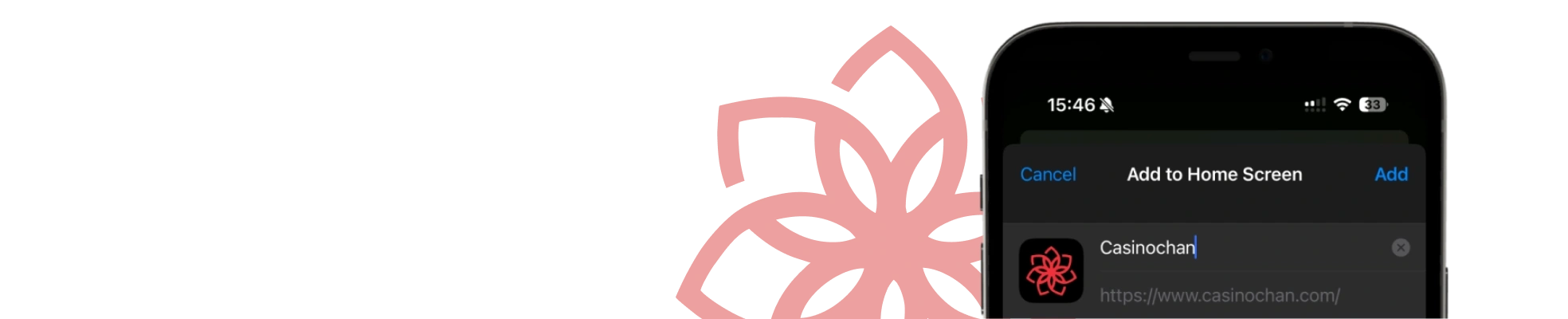
CasinoChan App for iOS — Smooth, Simple, and Built for Everyday Use
The CasinoChan iOS experience feels exactly how a modern app should — fast, light, and reliable. There’s no complicated setup, no waiting around for downloads, and no extra steps. You’re inside the casino within seconds.
How to Download and Install?
Here’s all it takes to get the CasinoChan icon on your iPhone or iPad:
- Open Safari and go to casinochan.com.
- Tap the Share button at the bottom of your screen.
- Choose Add to Home Screen.
- Tap Add again to confirm.
That’s it. You’ll now have the CasinoChan logo sitting on your home screen like any other app. Tap once, and it opens straight into your account — no browser bar, no loading delay.
Because it’s connected directly to CasinoChan’s main site, you get instant access to your games, balance, and bonuses. You can even enable notifications to get alerts for new releases or special offers.
System Requirements
The CasinoChan App for iOS barely uses any system resources. You just need:
- iOS 12.0 or newer
- Safari browser (update to the latest version)
- Internet or mobile data connection
No updates, no patches — the app refreshes itself every time you open it.
Compatible Devices
The app works smoothly on nearly all Apple devices. Older models up to iPhone X are supported. iPad Mini, Air, and Pro models all run the PWA seamlessly.
CasinoChan App for Android — Fast Access Without the Fuss
Android users get two choices: use the same lightweight PWA or install the full CasinoChan Android App directly from the website. Both run fast and securely, but the PWA option has the edge in convenience — no downloads, no permissions, no worries.
How to Download and Install?
To set up the CasinoChan shortcut on Android:
- Open Chrome and visit casinochan.com.
- Tap the menu icon (three dots).
- Select Add to Home Screen.
- When prompted, press Install.
Your phone will instantly create a CasinoChan icon on the home screen. Tap it anytime to enter your casino directly.
If you prefer the traditional app experience, you can install the CasinoChan APK from the official website. Simply tap the menu icon to find the download option, allow installation from trusted sources in your phone’s settings, run the file, and you’re good to go.
System Requirements
CasinoChan’s Android version is easy on the hardware. All you need is:
- Android 10.0 or higher
- Chrome browser
- 1 GB RAM or more
- Stable internet connection
Because it runs through Chrome, it won’t slow down your phone or fill up your memory. If you are downloading the full app, you’ll need about 175 MB of free storage space.
Compatible Devices
You can use the app on almost any Android phone or tablet, including:
- Samsung Galaxy series
- Google Pixel series
- Huawei, Xiaomi, Oppo, OnePlus, and others
The interface stays consistent across brands — clean, quick, and touch-friendly.
Sign UpMobile Casino Games — Designed for Play, Not Just Display
CasinoChan didn’t just shrink its desktop site to fit a phone screen — it actually redesigned the experience for mobile. The visuals stay crisp, buttons are spaced just right, and the menus are built for one-handed use.
Once you’re in, everything is where you expect it. Slots, live tables, jackpots, and tournaments all sit neatly in separate sections. Tap, swipe, and you’re in the game. The loading times are short, and even live-dealer streams stay stable on average Wi-Fi.
Every spin, card flip, and bet transition feels seamless. Whether you’re playing Elvis Frog Trueways, Gates of Olympus Super Scatter, or any of the 11,000+ slots, the animations are sharp, and the gameplay stays consistent with the desktop version.
Can You Play Without the App? CasinoChan Download vs Mobile Website
If you prefer not to add shortcuts or install the PWA, the CasinoChan mobile website gives you the same full experience. Just open casinochan.com on any browser, Chrome, Safari, or Firefox, and you’re ready to play.
The site automatically adjusts to your screen size. Everything feels fast and responsive — deposits, withdrawals, account settings, and even live chat run smoothly. You can claim bonuses, play live tables, or check VIP rewards without any restrictions.
For those who like quick access, you can always download CasinoChan app directly from the website and keep it on your home screen. Both versions, the web and the app, share the same SSL encryption, identical design, and access to the same tournaments and promotions.
So it really comes down to convenience: keep things minimal with the browser version, or go for the PWA or APK install if you prefer instant one-tap play.
Sign UpCommon Questions
1. Is the CasinoChan App safe to use in Canada?
Yes. The app connects directly to the official CasinoChan website using secure SSL encryption. There are no third-party downloads, so your information and payments stay protected.
2. Can I claim bonuses and promotions through the app?
All promotions, like free spins and deposit rewards, are available in the app just like on desktop. You can deposit, wager, and withdraw directly from your phone.
3. Do I need to update the app manually?
No. Because it’s a Progressive Web App, it updates automatically whenever the CasinoChan website does. You’ll always have the newest version.
