


CasinoChan App: Download on iOS and Android
Sign Up
If you’re looking for an “app” experience without visiting an app store, the CasinoChan mobile app is delivered as a Progressive Web App (PWA) you install straight from your browser. It gives you a clean icon on your home screen, push-notification opt-ins for new bonuses, and one-tap entry to the lobby.
You don’t download updates or chase store listings; the CasinoChan app lives on your device as a lightweight PWA, so it launches fast and doesn’t chew through storage. It mirrors the full lobby on mobile, keeps the address bar out of the way, and lets you jump back in from the icon whenever you’ve got a spare minute.
Mobile App for iOS
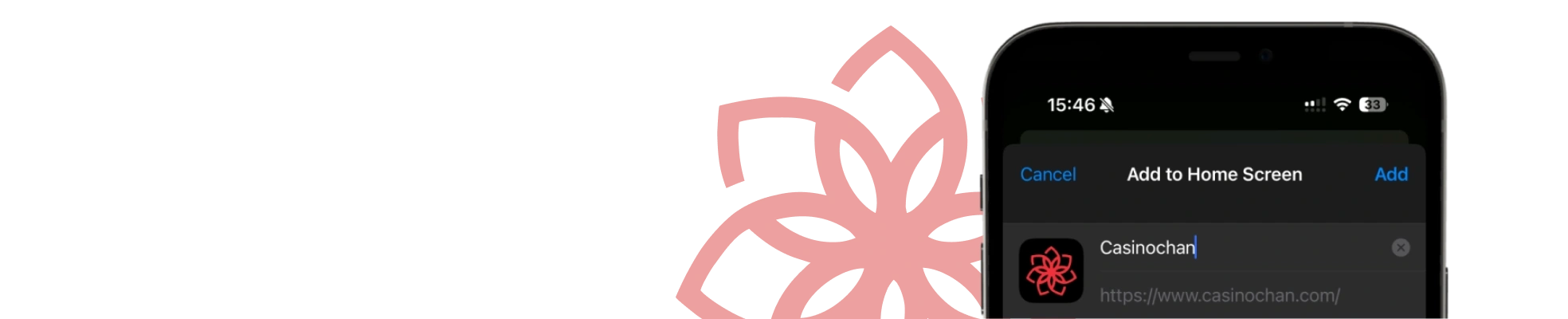
Instead of a store download, iPhone and iPad users install a lightweight PWA that behaves like a native shortcut and launches the casino in a standalone window. The page calls out fast access and optional notifications for promos.
How to Download and Install
The process takes seconds and uses Safari’s “Add to Home Screen” option:
- Open casinochan.com in Safari.
- Tap the “Share” icon → “Add to Home Screen”.
- Confirm Install; the icon appears on your Home Screen.
- Launch it like any other app, and you’re in the lobby with one tap.
If you don’t see “Add to Home Screen”, scroll to the bottom of the “Share” sheet to find it—you can also rename the icon before tapping “Add”.
System Requirements
Practically, if your device runs a recent Safari with the “Add to Home Screen” option, you’re all set. Keep iOS and Safari updated for the smoothest performance, and use a stable internet connection—the PWA is lightweight and uses minimal storage.
Compatible Devices
Here’s what works for the CasinoChan iOS setup and how it launches once installed:
- iPhone with Safari and the “Add to Home Screen” option enabled.
- iPad (any model using Safari) with “Add to Home Screen” available.
- Home-screen icon opens CasinoChan in a standalone window for faster, one-tap access.
- Push notifications can be enabled after installation to receive bonus alerts.
No App Store CasinoChan download is required — the installation happens directly from the browser.
Mobile App for Android
On Android, you download CasinoChan app via Chrome (or another supported browser). The PWA behaves like a regular app icon and loads fast; the page also highlights push notifications and one-tap entry.
How to Download and Install
CasinoChan Android installation uses Chrome’s “Add to Home Screen” option and takes under a minute.
- Open casinochan.com in Chrome.
- Tap the browser menu → “Add to Home Screen”.
- Confirm “Install”; the icon lands on your Home Screen.
- From there, tap the icon to open the lobby directly.
If you don’t see the prompt, update Chrome and try again — other modern browsers with PWA support follow a similar flow.
System Requirements
If your browser supports “Add to Home Screen”, you can install and use the PWA (Android support is stated on the page). For smooth play, keep your browser up to date and use a stable internet connection — performance largely depends on your device and network.
Compatible Devices
Focus on hardware that runs it well:
- Android phones from major brands (Samsung Galaxy, Google Pixel, Xiaomi/Redmi, OnePlus, Motorola) on Android 8.0 or newer — best experience on Android 10+.
- Android tablets such as the Galaxy Tab, Lenovo Tab, and Xiaomi Pad lines.
- Foldables and large-screen devices (e.g., Galaxy Z Fold/Flip, Pixel Fold) — the layout adapts cleanly.
- Entry-level/Android Go models from 2019 onward can run it; expect slower load times on older chipsets.
If your device can run a current Chrome, Firefox, or Edge build on Android, it can run the CasinoChan PWA. That’s the whole setup, no CasinoChan APK needed
Sign UpMobile Casino Games
The mobile experience mirrors desktop play: pokies, table games, and live dealer titles open in your phone browser, and the site specifically says there’s no need to download anything to play on Android or iOS.
Just visit, tap your game, and go. For quick picks on mobile, try slot favourites like Fire Coins: Hold and Win or Buffalo Hold and Win, then hop to tables such as Speed Blackjack or Mini Roulette when you want a live-dealer change of pace.
Mobile Website Version
Prefer not to install? Use the mobile web. The CasinoChan site works seamlessly across Android and iOS devices, so you can play directly in your browser with full lobby access and the same quick navigation. Plus, it’s easy to use on any device without having to leave a trace.
Sign UpCommon Questions
1. Is there a traditional app store download?
No—there’s no App Store/Google Play listing at the time of writing. Instead, you install the PWA by using “Add to Home Screen”, which places a launch icon on your device and opens the casino in a standalone window.
2. Why use the browser-install PWA instead of just the website?
You get one-tap access, optional push notifications for new bonuses, and faster loading according to CasinoChan’s PWA page — handy if you play often and want a quicker entry point.
3. Can I enable push notifications on the PWA?
Yes. After installation, open the icon and accept the notification prompt when it appears. If you missed it, check your browser or site settings to allow notifications so you receive bonus and update alerts.
