


CasinoChan App: Download on iOS and Android
Sign Up
On paper, CasinoChan boasts thousands of games, live dealers, crypto support, and smooth mobile play. We tested it across iOS and Android, looked at how fast it loads, what games really work on small screens, and whether promos and withdrawals behave as promised.
Below, you’ll find step-by-step install guides, device compatibility, what the mobile games look like, and how the browser version stacks up. No fluff, just what you need when you’re ready to play.
Mobile App For iOS — Easy Setup, No App Store Drama
Playing CasinoChan iOS is straightforward — the platform doesn’t deliver a traditional app via the App Store. Instead, the experience comes via a browser-based install that behaves like an app.
How To Download And Install?
- Open Safari.
- Go to the CasinoChan website.
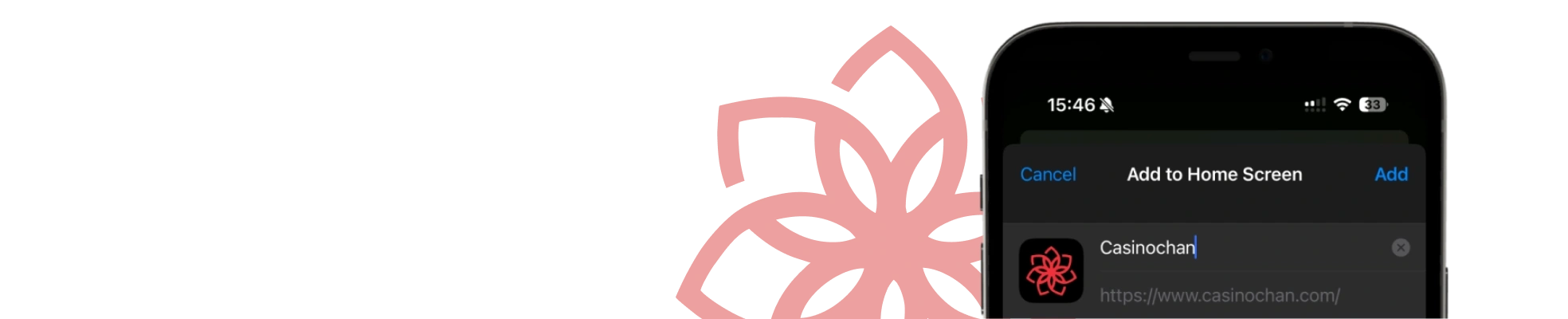
- Tap the “Share” button, then “Add to Home Screen,” and press “Add”.
That creates a shortcut icon on your home screen. When you tap it, it opens in full-screen mode, with minimal browser chrome. That’s your CasinoChan app – any time in action.
System Requirements
You’ll need iOS 13 or newer for the best performance. Older systems may struggle with rapid page redraws or laggy live video. Since it’s a PWA (progressive web app) style install and not a full native app, you rely on Safari’s stability and your phone’s power.
Compatible Devices
iPhones from SE (2nd gen), 8, X, 11, 12, 13, 14, and above all work fine. iPads too. Because the install is just a browser shortcut, there’s no need for special software or extra accounts — you just log in like normal.
Mobile App For Android — Light, Fast, And Perfectly Functional
Android users get a similarly slick setup, but with a little more freedom. CasinoChan doesn’t appear in the Play Store either, but you can still install it as a Progressive Web App that behaves just like a native one. No permissions, no background drain, no unwanted ads.
How To Download And Install?
- Open the CasinoChan website in Chrome (or another modern browser).
- Tap the browser menu.
- Choose “Add to Home screen”.
- Then confirm “Install”.
The icon shows up on your launcher and functions like a real app. That’s the Download CasinoChan app step for Android.
System Requirements
Android version 8.0+ is recommended. Devices with at least 3 GB of RAM handle live games with no trouble. If your phone is older, the site automatically scales resolution and interface to keep gameplay stable. The casino doesn’t provide a native CasinoChan APK, and that’s a good thing — it means no fake clones floating around third-party stores.
Compatible Devices
Most modern phones are covered. Whether you’re on Samsung, Huawei, LG, Xiaomi, or Pixel, the mobile site recognizes your setup instantly and adapts to your screen. The same goes for tablets — the interface stretches cleanly without distortion.
The PWA engine runs light, so battery drain stays minimal. That’s something you’ll notice if you’re gaming for long sessions. For users wondering if CasinoChan Android handles large-scale games — yes, it does, and with crisp HD streams.
Sign UpMobile Casino Games — 3,000+ Titles, Real Dealers, And Crypto Play
This is where CasinoChan earns its reputation. The mobile version carries over the full library — more than 3,000 games, with slots, live dealer tables, jackpots, and BTC titles. Unlike some casinos that limit you to a stripped-down catalog, everything here is mobile-optimized through HTML5.
You’ll find:
- Demo mode on many slots (you can try without risking real money).
- Live tables: Roulette, Blackjack, Baccarat, game shows with real dealers.
- Filters by developer, type, or new releases.
- BTC or crypto-friendly titles too (for players who prefer crypto banking).
Slots providers include:
- Play’n GO.
- Playtech.
- Pragmatic Play.
- ELK.
- Red Tiger, and more.
Live dealer rooms are powered by:
- Evolution.
- Pragmatic Play Live.
- Ezugi.
- Absolute Live Gaming.
We tested a few live rooms on mobile — the video streams held up well on strong WiFi or 5G, though on weak LTE, we saw occasional frame drops.
Mobile Website Version — When You Don’t Want To Install Anything
Some players prefer to skip installs altogether, and CasinoChan makes that perfectly fine. The mobile website mirrors the full casino experience without losing any functionality. You can register, deposit, claim bonuses, join live tables, and withdraw winnings — all through your browser.
Performance-wise, it’s strong. The site’s responsive HTML5 design loads fast on 4G and 5G networks, and transitions between categories are instant. On our tests, it opened in under three seconds on Chrome and Safari, even with a poor connection. The design feels intuitive — clean buttons, quick filters, and visible game previews that don’t stretch your data plan.
Push notifications and quick login are also part of the mobile site setup. You can opt to receive updates about bonuses, tournaments, or new slots directly from your browser. The casino itself promises “Easy and fast access” and “Play wherever you are,” and honestly, that description fits. With one click, you’re back to spinning.
Sign UpCommon Questions
1. Why is there no app in the App Store or Play Store?
CasinoChan opts for a PWA-style install, so there’s no native App Store or Play Store version. For those who later decide they want quicker access, there’s also the simple CasinoChan Download path via the “Add to Home Screen” option.
2. Do all games work in mobile mode?
Most yes, especially slots and live dealer titles. Some heavy animations or side features may be trimmed or simplified on smaller devices, but core play is intact.
3. Is there a difference between using a browser vs an app shortcut?
Performance is similar, but the shortcut gives you a faster startup and hides browser chrome. Otherwise, CasinoChan bonuses, features, logging in, and withdrawals are all available both ways.
